 Call Now
 Whatsapp Now


Apply now for Free Counselling
Apply Now:
top-rated institute in Borivali, Mumbai - Ai Courses.
After 10th, 11th & 12th.


UI/UX design is about creating apps and websites that look good (UI) and are easy and satisfying to use (UX). Today, AI tools such as Figma's AI features can generate rough layouts, rename layers and check accessibility, but user research, problem-solving and usability testing still depend on the designer. Beginners should learn the process first and use AI to speed it up.
UI vs UX: What Is the Difference?
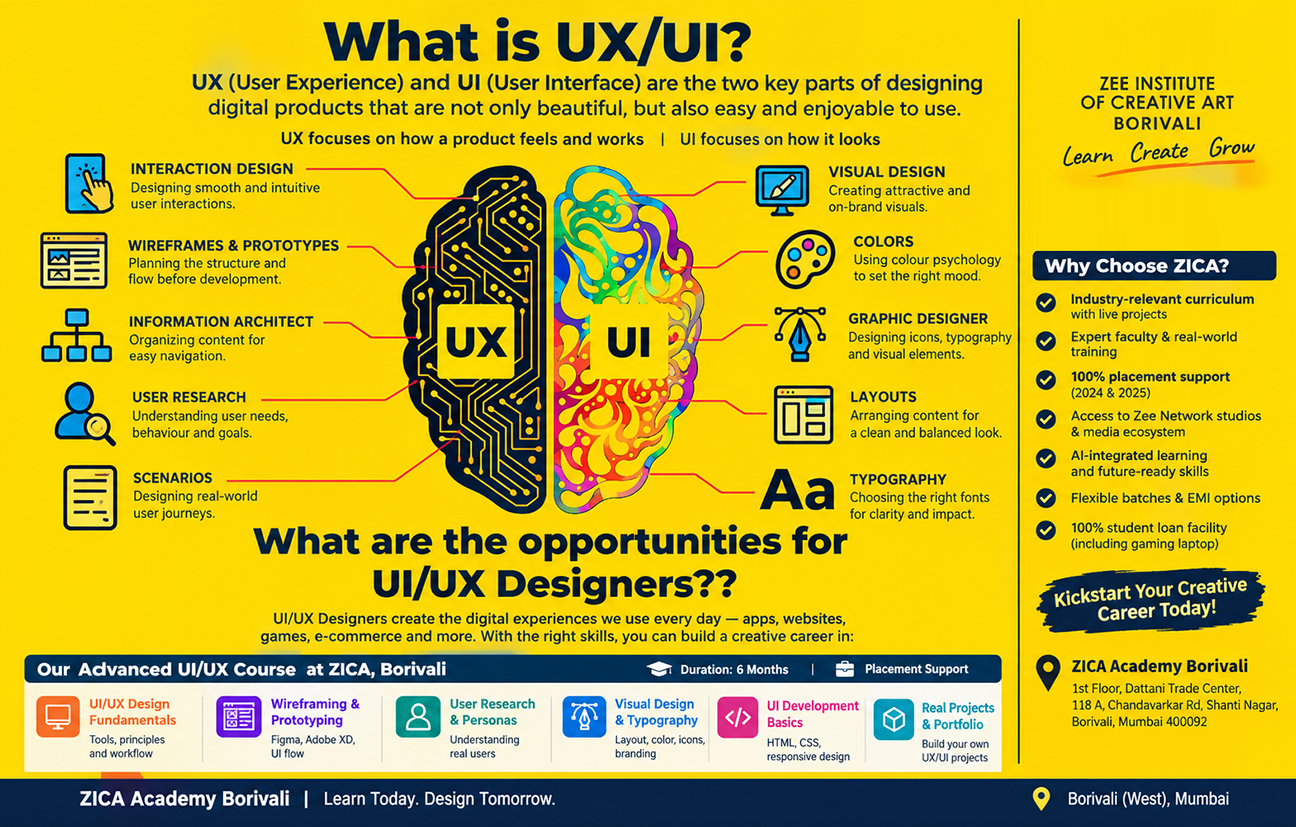
UX (user experience) design is about how a product works — understanding users, mapping their journey and making the product easy to use. UI (user interface) design is about how it looks — layouts, typography, colours, buttons and icons. Most beginner roles expect you to understand both, which is why courses usually teach them together.
How AI Helps UI/UX Designers Today
Design tools have added AI features that remove repetitive work. Industry guides on Figma's recent features describe capabilities such as:
• Layout generation. Tools like Figma Make can create starting UI layouts from a text prompt — best suited to rough mockups and early exploration rather than finished designs.
• Layer naming and asset search. AI can rename messy layers sensibly and help locate assets across files.
• Accessibility checks. Automated checks for colour contrast, touch-target size and reading order catch common problems early.
• AI-assisted prototyping. Faster ways to turn static screens into clickable flows.
Features change quickly, so treat any tool list as a snapshot and check each product's current documentation.
What AI Cannot Replace in UX Design
Industry commentary on these tools makes the same point: they help with design-side tasks, but they do not replace user research or systems thinking. The parts of the job that stay human are:
• User research and personas. Talking to real people to find out what they actually need.
• Information architecture and user flows. Deciding how a product is organised and how users move through it.
• Usability testing. Watching real users struggle or succeed and acting on what you see.
• Design systems. Keeping buttons, colours and components consistent as a product grows.
• Business and context. Balancing what users want with what a company can build.
A UI/UX Skills Roadmap for Beginners
1. Design thinking and user research — learn to define a problem and understand users and personas.
2. Information architecture, user flows and journey maps — structure how a product is organised.
3. Wireframing — sketch low-fidelity and high-fidelity layouts.
4. Visual design — typography, colour, layout, responsive web design and mobile app UI.
5. Prototyping — build clickable, interactive prototypes in a tool such as Figma.
6. Design systems and components — create reusable icons, buttons and UI elements.
7. Usability testing — test with real users and improve the design.
8. Portfolio, resume and interview preparation — package your work into case studies.
ZICA Academy Borivali's UI/UX Design course covers this journey, from design thinking and wireframing to prototyping, design systems, usability testing and portfolio development. Ask a counsellor for the current software list and batch details.
What a Strong UI/UX Portfolio Should Show
• 2–3 detailed case studies rather than many screenshots.
• The full process — the problem, research, early sketches, wireframes, final design and what you learned.
• Real decisions — why you chose a layout or flow, and how testing changed it.
• Honest use of AI — show where AI helped (for example, rapid first drafts) and where your judgment improved the result.
A graphic design foundation also helps with the visual side of UI; see our Graphic Design Diploma if you want to strengthen it first.
Learn UI/UX Design at ZICA Academy Borivali
See the complete curriculum on our UI/UX Design course page. Students from Kandivali, Malad, Goregaon, Dahisar, Mira Road, Bhayander, Naigaon, Vasai and Virar reach ZICA Academy Borivali on the Western Line. Call +91 99679 96860 or book a free counselling session.
Frequently Asked Questions
Can I become a UI/UX designer without coding?
Yes. UI/UX designers create layouts, flows and prototypes rather than writing production code. Understanding how developers work helps, but coding is not required to start.
What is the difference between UI/UX design and graphic design?
Graphic design focuses on visual communication such as logos, branding, print and social creatives. UI/UX design focuses on how apps and websites look and work for users. They share tools and visual skills, so many designers move between them.
Will AI replace UI/UX designers?
AI can generate rough layouts and automate small tasks, but it does not replace user research, usability testing or systems thinking. Designers who understand users and use AI to work faster are better positioned than those who rely on either alone.
Which tool should I learn first for UI/UX design?
Figma is widely used for interface design and prototyping and is a common first tool. Photoshop and Illustrator help with visual assets and icons. Learn the design process first, because it applies to any tool.
Annual Events, Studio Visits, and Industry Exposure
Beyond the classroom, ZICA Borivali gives students real-world exposure through annual events, studio visits, exhibitions, and industry tours — connecting students directly with the industry before they even graduate.
Career Opportunities & Placement Support After UI/UX Design
After completing the UI/UX Design course at ZICA Academy Borivali, you can apply for roles such as UI Designer, UX Designer, Product Designer, Web Designer, Interaction Designer and Junior UX Researcher. These roles exist in IT companies, startups, design studios, digital agencies and e-commerce brands. Our placement team supports you with portfolio reviews, resume building, mock interviews and job openings shared through our industry network. Your portfolio of case studies, built during the course, helps hiring managers see your skills clearly. Placement support is provided to help you reach opportunities; selection depends on your skills, portfolio and interview performance.
Zee institute of creative art
LOCATION ADDRESS :
Borivali Branch:1st Floor, Dattani Trade Center, 118 A, Chandavarkar Rd, Shanti Nagar, Borivali West, Mumbai,Maharashtra 400092